AI Prompt Input
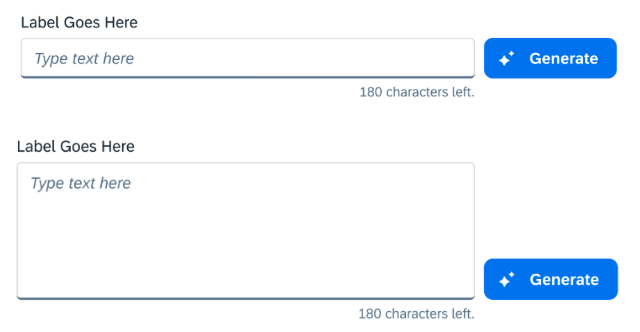
The AI prompt input is a core UI element for interacting with generative AI. Its primary function is facilitating custom prompts written by the user in natural language. It may also support other input options such as images, voice, or file formats.
Usage
Do:
- Use to facilitate custom prompts written by users to instruct AI systems.
- Use when users need to provide additional context.
Don't:
- Don't use for straightforward tasks that don't need custom prompts.
- Don't use if the AI supports only a limited number of tasks — use quick prompts instead.
- Don't rely solely on it for tasks requiring highly technical knowledge better suited to specialized interfaces.
Best Practices
- Improve input efficiency with predictive text features like typeahead suggestions and auto-completion.
- Leverage AI input fields to create personalized interactions that learn from user input over time.
- Avoid limiting input options to a single modality when users may benefit from multiple.
Variants
- With Label — Always provide a meaningful label. Set "Required" on the label for mandatory fields.
- With Character Counter — If you have set a character limit without restricting input, the counter shows remaining or exceeded characters.
- With Textbox — Use a textarea when the prompt could be longer. The textarea can have automatic height but a defined maximum.
- With AI Unit Counter — If the customer has purchased a defined amount of AI units, the counter shows remaining units with a tooltip for purchasing more.
Responsible AI
Allowing users to create custom prompts gives them more freedom, but can also lead to issues like incorrect answers for unclear prompts or the risk of perpetuating bias. Be transparent about AI usage and implement measures to detect and flag potentially biased prompts.
Input
Preview
Textarea
Preview