AI Prompt Settings
Prompt Settings provide structured input UIs to guide the user in instructing the generative AI model on the desired output. All provided information is combined into a processable prompt in the back end — users only need to select their desired options.
Usage
Do:
- When users are known to use the feature for a limited set of queries.
- When the system can assist with a specific and limited number of actions.
- When users have little to no experience with writing prompts.
- When users need to customize inputs for a more flexible experience.
- When consistent and predictable outcomes are required.
- When users need more flexibility in directing AI output.
Don't:
- When users lack subject matter expertise (consider quick prompts instead).
- When only repetitive or common workflow actions are involved.
- When the use case requires only one or a few specific actions.
Variants
Within a Dialog
Best for simpler prompt settings experiences. Avoid stacking dialogs.
Use when: The guided prompt use case is more complex, there is limited horizontal space, or there is already a high information density on the screen.
Avoid when: The dialog would have too many input options — use a separate page instead.
On a Separate Page
Best for more complex guided prompt experiences.
Use when: The prompt could have many settings, or information density is already very high.
Avoid when: Only a few input options are needed, or a separate page would be too disruptive.
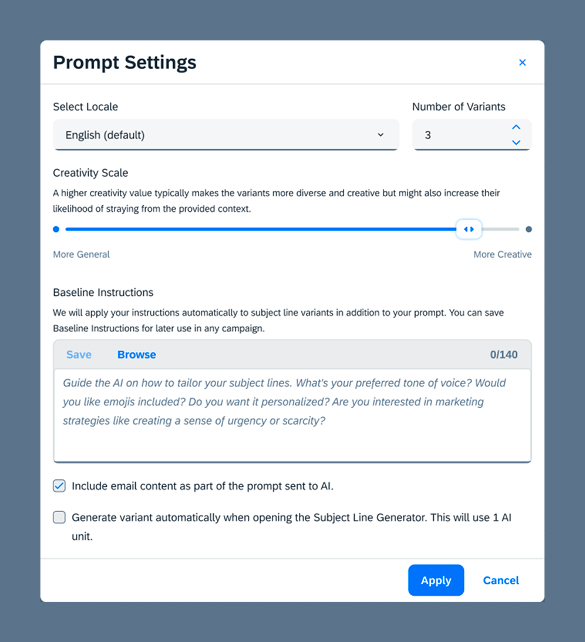
Example Scenario: Text Composition
Common prompt parameters for text composition:
- Language/Locale — Select control for language options
- Creativity — Slider
- Number of Variants — Controls how many variants are generated
- Protected Terms — Words or phrases not to be modified during generation
- Excluded Terms — Words or phrases not to be used in generated content
- Specific Prompts — Language-specific prompts providing wider context
- Baseline Instructions — Sets a general tone for generated content (tone of voice, emoji use, etc.)
Responsible AI
Use prompt settings transparently — clearly indicate when users are engaging with AI features. Avoid misleading language that may obscure AI involvement. Offer inclusive prompt settings representing diverse preferences. Carefully craft instructions to prevent unintentional bias.