AI Quick Prompt
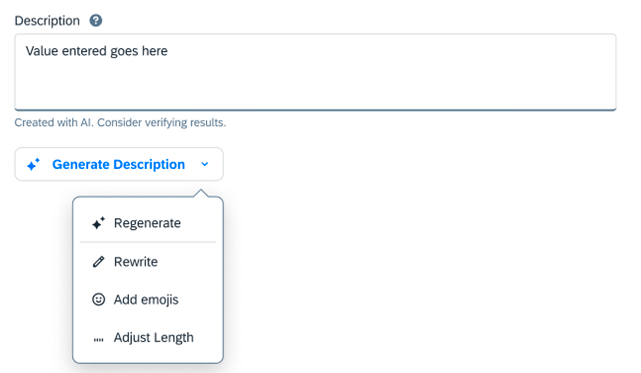
Quick prompts are pre-defined AI actions integrated into workflows for easy access. They are crafted by prompt engineers to guide the AI efficiently, without requiring users to write their own instructions.
Usage
Do:
- When tasks are repetitive or common within a workflow.
- When input options may be limited (e.g. mobile scenarios).
- When the system can only assist with specific actions.
- When users lack expertise in the subject matter.
- When minimizing bias from user-written prompts is important.
- When consistent and predictable outcomes are essential.
Don't:
- When a user's intent is unpredictable.
- When users need more flexibility in directing AI output.
- When providing non-AI-related actions — use a dedicated menu button for those.
Behavior and Interaction
Content Generation
Clicking the AI button initiates content generation. The AI button transforms to a Stop Generating button, enabling users to stop at any time. Primary actions are disabled until generation is complete to prevent access to partially generated content.
Fine-Tuning
Once generation is completed or stopped, the Stop Generating button transitions to an AI menu button offering quick prompt actions that users can apply to the generated content.
Handling Errors
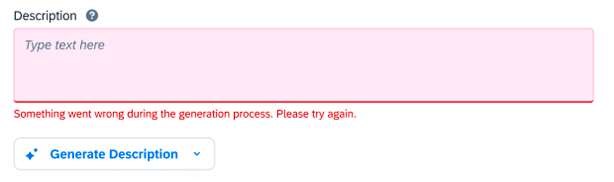
If a quick prompt is interrupted or fails, use the following error message for consistency:
"Something went wrong during the generation process. Please try again."
Grouping
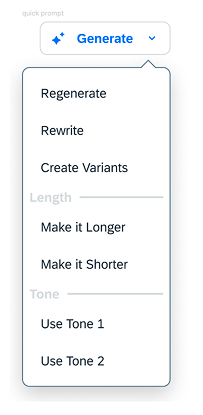
Organize prompts into submenus when necessary to minimize visual clutter. Group quick prompts by purpose. Prioritize essential actions at the top of each group.
Example submenus:
- Rewrite Text: Simplify, Expand, Rephrase, Summarize
- Change Tone: Make More Casual, Make More Professional
- Adjust Length: Shorten Text, Lengthen Text
- Translate: Language 1, Language 2…
Standard AI Action Labels
AI Button Labels:
- Generate — Create or produce something using AI.
- Revise — Change or alter existing content using AI.
Submenu Labels:
- Rewrite Text, Change Tone, Adjust Length, Translate
AI Action Labels:
- Fix Spelling and Grammar, Simplify Text, Expand, Rephrase, Summarize, Make More Casual, Make More Professional, Shorten Text, Lengthen Text, Make Bulleted List, Explain Content
For actions not listed: use a verb in the imperative, keep labels as short as possible, use them consistently.