AI UI Text
AI UI text is the primary means of communication between users and AI systems. It conveys information, instructions, errors, and feedback — ensuring users can understand and effectively interact with AI functionality.
These guidelines build on the existing UI Text Guidelines for AI-specific contexts, rather than replacing them. They are based on US English, the primary source language at SAP.
Understanding Users and Context
Creating effective UI text for AI requires understanding who your users are and how they interact with the system:
- Recognize preferences — tailor UI text to user habits.
- Understand user goals — clarify what users aim to achieve.
- Map user tasks — identify the specific tasks users will perform.
- Determine the interaction context — consider devices and environments (mobile, web, on-the-go).
- Adapt to the context — use short prompts for mobile, detailed instructions for web.
Types of UI Text for AI
Explanations
Make AI actions and decisions clear to users, enhancing transparency and trust. Keep explanations as concise as possible.
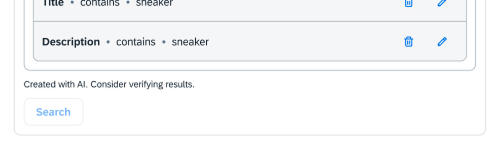
Do: "Created with AI. Consider verifying results."
Don't: "Generated utilizing advanced artificial intelligence algorithms. Validate output integrity prior to deployment."
Instructions
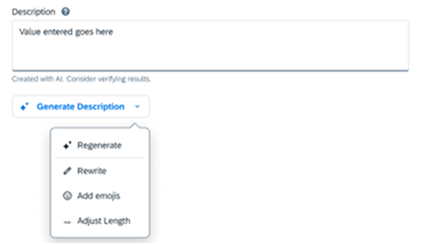
Guide users through tasks within AI systems with step-by-step directions to minimize errors and confusion.

Do:
- Offer step-by-step, easy-to-follow instructions. E.g. "Fix spelling and grammar", "Tell AI what to do".
- Ensure users can efficiently use AI features.
- Minimize user errors by providing clear and concise instructions.
Don't:
- Don't give ambiguous instructions. E.g. "Make corrections".
- Don't provide overly complex instructions. E.g. "Ask Artificial Intelligence to generate content".
Description
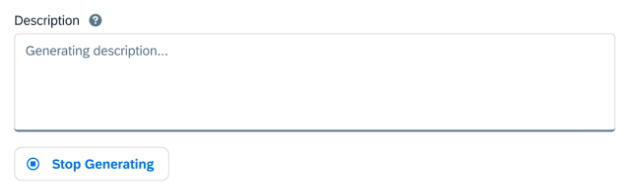
Introduce users to AI capabilities and explain what the AI system does and how it operates.
Do:
- ✅ Output may contain errors.
- ✅ Analyzing request…
Don't:
- ❌ Consider verifying AI output errors.
- ❌ Artificial Intelligence is analyzing the current request…
Do:
- Clearly describe AI functions and capabilities.
- Let users know what to expect: "Output may contain errors."
- Explain how users can engage with AI.
Don't:
- Don't use generic or unclear descriptions.
- Don't expect the user to trust AI output without verification.
Error Messages
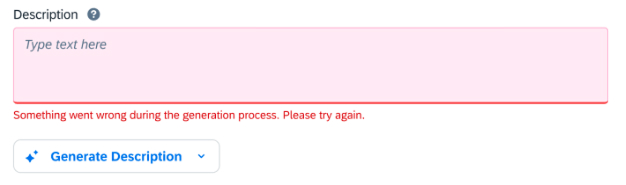
Provide clear, specific guidance on resolving issues. Help users understand what went wrong and offer actionable steps.
Do:
- ✅ Something went wrong during the generation process. Please try again.
- ✅ It looks like an error occurred during the generation process. Try generating again.
- ✅ Your request couldn't be generated. Try refining your request and generating again.
Don't:
- ❌ System error. Contact administrator.
- ❌ Artificial intelligence is having trouble understanding you.
Do:
- Help users resolve issues that arise during AI interactions.
- Give clear and actionable directions on what went wrong and how to fix it.
Don't:
- Don't provide vague or generic messages.
- Don't suggest actions that are incorrect in the user's context.
Summary
Designing UI text for AI interfaces involves clear, concise, user-friendly communication. Key principles:
- Understand the target audience and their goals.
- Use simple and direct language.
- Maintain consistency in tone and terminology.
- Provide immediate and clear feedback.
- Consider accessibility — ensure text is readable for all users.