UI Text Guidelines
This document helps designers, developers, and translators learn about making UI Text (such as labels, headings, and messages) effective and consistent across the platform.
Approach
Keep it short and to the point:
- Simplify sentences and use shorter words, without compromising the meaning.
- Use "Go to" instead of "Navigate to".
- Use "Campaign was created" instead of "Campaign has been created in your account".
- You can omit the UI component's name, e.g. use "Click Save" instead of "Click Save Button".
- UI text should be simple and short not to save space, but to make the UI easier to read.
- Avoid using redundant words.
- Use "Create Campaign" instead of "Create New Campaign".
- Use tooltips to hide explanations.
Aim for consistency by following the guidelines:
- Always try implementing what's documented, even if other parts of the product might not follow it. Some of the UI might be outdated, while the documentation has the latest guidelines.
- If something is missing from the SAP Engagement Cloud documentation, check the SAP documentation.
- When something is not documented, try using other SAP Engagement Cloud pages as reference. In this case, notify the Design System team about the missing documentation.
English first:
- We use English as the default language for our products. Translations are made based on the English text.
Expect longer text when translated:
- Translated text might be longer or shorter than the original English text, so make sure the layout can adapt.
Know how "translation strings" work:
- Knowing the technology and workflow behind how we translate from English to different languages can help writing text that's easier to translate.
- For translation constraints, see below.
General Rules
Abbreviations:
- Avoid using non-standard abbreviations, like VCE, VCMS, SI.
- Industry standard abbreviations can be used, like AOV, but explain them on the UI, like in a tooltip or in a helper message.
- Avoid latin abbreviations, use full form instead:
- "e.g.": for example
- "i.e.": that is
- "etc.": and so on
- "n.b.": note
- "et al.": and others
- "vs.": opposed to, versus
- "cf.": compare
Symbols:
- Avoid using symbols like "&", "/", "+" as shorthands for words in sentences; use "and", "or", "plus" instead.
- Avoid semicolons (;), use separate sentences instead.
Messages:
- Confirmation messages:
- Avoid lengthy titles. Instead of "Are you sure you want to delete this campaign?", use "Delete campaign?".
- Error messages:
- Avoid generic error messages like "Something went wrong".
- Specify the error when possible: "Couldn't establish a connection with the server".
- Propose solutions when possible: "Couldn't establish a connection with the server. Please try again in a minute."
- Success messages:
- Avoid redundant "successfully" or "success". Use "File uploaded" instead of "File uploaded successfully".
Formatting with utility components:
- Numeric component — can display "10000000" as "10,000,000".
- Currency component — can display "256" as "$256".
- Time component — can display "2018-03-22T14:39:15.087" as other date and time formats.
Breadcrumbs and access paths:
- When referencing an access path inside SAP Engagement Cloud, separate the path by ">".
- Example: Channels > Emails
Positive formulations:
- Use positive formulations in checkboxes and switches.
- Use "[✓] Enable this feature" instead of "[✓] Disable this feature".
Text style formatting (bold, italics, underline, uppercase):
- Avoid using text formatting like bold and italic to convey meaning or semantics.
- Avoid using uppercase. Uppercase is reserved for certain non-translatable technical expressions, for example AND, OR.
- Links should be underlined in sentences.
Product names and "trademark" feature names:
- Use title case for products, features, and asset types that have specific meaning in the context of SAP Engagement Cloud.
- Example: Measurement Node, Empty Cart Tactic
- Example: Tactics, Home, Strategic Dashboard, Smart Insight, Predict
Active voice and passive voice:
- Use active voice in actions, like button labels and instructions. Use "Upload your data" instead of "the data needs to be uploaded".
- Use passive voice when describing a situation, like in error messages. Example: "File not found".
Tenses:
- If there was an error in the past but it can be fixed, use past tense: "File was not found. [Search Again]".
- If there is a persistent error that cannot be fixed, use present tense: "File cannot be found."
- Use simple past tense instead of present perfect tense — it's shorter and easier to understand for non-native speakers.
Noun phrases vs verb phrases:
- In page titles and headings, use noun phrases ("Content Creation") instead of verb phrases ("Create Content").
Titles and headings:
- Titles should always be Title Case (in English).
- Make titles as short as possible; aim for less than 5 words.
- If a title becomes more than 5 words, simplify it by describing information in inline text, a helper message, a tooltip, or a notification.
- Avoid redundant words in headings that are already present in the page title.
- In the "Email Settings" page, instead of "Email Sender Settings" use "Sender Settings".
Visual navigation:
- Avoid referring to content or UI elements by their location on the screen, as future layout changes might break these references.
- Instead of "Click the button at the top right", use "Click Save".
Avoid using the term "country":
- For legal reasons, do not use "Country". Use "Country or Region" or another term that works in the given context, like "Market".
Translation Constraints
Translation strings are individual, translatable content. The strings appear as placeholders in the UI code instead of actual UI text, and are replaced with a translation based on the user's preference. For example, the string {saveButtonLabel} will be replaced by "Save" in English, and by "Mentés" in Hungarian.
Variables are text that don't come from translations, but from content, like the title of an email campaign or a date set by the user.
Avoid putting grammatical rules in variables:
- Instead of "Start the program
{in the morning}", use "Start program:{morning}", so the variable won't contain grammatical words ("in"), making it easier to translate.
Avoid string fragmentation:
- Translation strings should be as self-contained as possible, otherwise translators won't have the proper context.
- Instead of
{Uploaded on:} {Date-Time}, use{Uploaded on: {Date-Time}}.
- Instead of
- As not all components can be easily turned into text placeholders that translators can move around without breaking the UI, insert components at the end of a sentence, separated from the text.
- Instead of
{Wait {Number Input} days before re-entry}, use{Number of days before re-entry: {Number Input}}.
- Instead of
Avoid marking plurals with "(s)":
- Some languages have multiple forms for plural, or solve plurals without suffixes.
- Alternatives:
- Separate strings for singular and plural cases: "File uploaded" / "Files uploaded".
- Use plurals only: "Change the contracts."
- Use "One or more" in front of the plural noun: "Create one or more backup files."
- Use "Noun or nouns": "Select the region or regions for the sales revenue report."
- Use "each", "every", or "any of": Instead of "Drag the file(s) to the relevant folder(s)", use "Drag each file to the relevant folder".
- Disconnect number from noun: Instead of "
{n}file(s) were deleted", use "Number of deleted documents:{n}".
Use descriptive string names:
- Translators might only look at the text, without the screens. If possible, use descriptive string names (placeholders). You and the developers know the purpose of the string, but the translator might not.
- Instead of "Created on: <stringone>", use "Created on: <datetime>".
Include punctuation in translatable strings:
- Punctuation (periods, commas, colons, hyphens, etc.) should be included in the translatable string, so translators can see the whole context.
- Instead of
<Created on>: <datetime>, it should be<Created on:><date>. - Instead of
<Good Morning>, <name>!, it should be<Good morning, <name>!>.
- Instead of
- Other languages may use punctuation differently (in French, a space precedes colons).
Component-Level Rules
Button labels:
- Simplify and shorten labels as much as possible. Use "Upload File" instead of "Upload the File".
- Button labels should describe the action, not a response. For "Delete This Campaign?", use "Delete" instead of "OK" or "Yes".
- Use "Close" instead of "OK" as the button text for closing an error message.
- Use "OK" if the user is just acknowledging a piece of information or a group of settings.
- Buttons that navigate the user should also imply the action: instead of just "Detailed View", use "Go to Detail View" or "View Details".
- When pressing the button results in multiple actions, use the most prominent action as the label. Use "Save" instead of "Save and Apply". Exception: when it's critical to emphasize multiple actions.
Input labels:
- "Labels" are input field labels, switch labels, checkbox labels, radio labels, column labels, tab labels, etc.
- Use title case for labels.
- Simplify and shorten labels as much as possible. If the label needs to be long, use a short label with a tooltip or helper message.
- Don't put a colon at the end of the label. Exception: use a colon when the label is next to the field in a horizontal layout.
Input placeholder texts:
- Placeholder text helps the affordance of interactive elements, making it apparent that the input field can be typed into. Proper labeling and contextual messages are more important than placeholder texts.
- Should be a command describing what the user should do in this field:
- "Search" text input: "Type search keywords here"
- "Audience" select: "Choose recipient list"
- Only use "please" sparingly — reserve it for error messages or inconvenient situations.
- If the input expects a specific format, it can contain an example:
- "Email" input: "For example: john.doe@gmail.com"
- "Phone number" input: "Enter phone number, for example: +36 30 5432 109"
- Do not replace field labels with placeholders.
- Do not put validation-critical text in placeholder text — if the input format is validation-critical (like password requirements), it should be visible near the input field.
- Use incomplete sentences: sentence case, with no punctuation at the end.
Radio button and checkbox options:
- Options can be either labels (short, Title Case) or sentences (longer, Sentence case) depending on the content. Don't mix the two kinds in the same list.
- For options with sentences, use incomplete sentence rules: no punctuation, unless it's multiple sentences.
Tables:
- Plurality:
- Use singular in the column header if there can only be one item in the cell. Example: "Category": "Email Campaign".
- Use plural in the column header if there are potentially multiple items in the cell. Example: "Tags": "Tag1, Tag2, Tag3".
- Empty cell: if a cell has no content, leave it blank. Do not display placeholder text like "N/A".
- For resource names, specify the kind of resource in the column heading. Instead of "Name", use "Email Name", "App Name", "Message Name", etc.
- For date-time columns, use: "Created On", "Changed On", "Launched On", etc.
- For username columns, use: "Created By", "Changed By", "Opened By", etc.
- If the column is designed to contain multiple values, separate them with a slash with spaces around it. Example: "Country / Language": "HU / HU".
Learn more links / helper link component:
- When used in a complete sentence as a link: sentence case with punctuation.
- When used in an incomplete sentence as a link: sentence case without punctuation.
- When used as a button: title case.
Tooltips:
- If the tooltip contains inline text content, use sentence case.
- If it replaces a button label (like for icon buttons), use title case.
Notifications:
- Use past tense for error notifications. Example: "File Not Found".
Empty states:
- Use present tense for empty states. Example: "No Data Available".
English Grammar Rules
Plurality:
- When a label refers to a single item, use singular (e.g. "Name" in table header).
- When a label might refer to multiple items, use plural (e.g. "Select items").
- In messages, have different messages for plural and singular results ("You have 1 day to do this" vs "You have 2 days to do this"). Avoid "(s)" to make plurality conditional.
Capitalization:
- Title case — major words are capitalized:
Now This Is What I Call Title Case- Use for short texts like titles, headings, and labels.
- Don't use punctuation.
- Sentence case — only the first word is capitalized:
Now this is what I call sentence case.- Use for text with one or more sentences.
- For complete sentences, use punctuation:
Select your preferences, and submit form. - For sentence fragments, don't use punctuation:
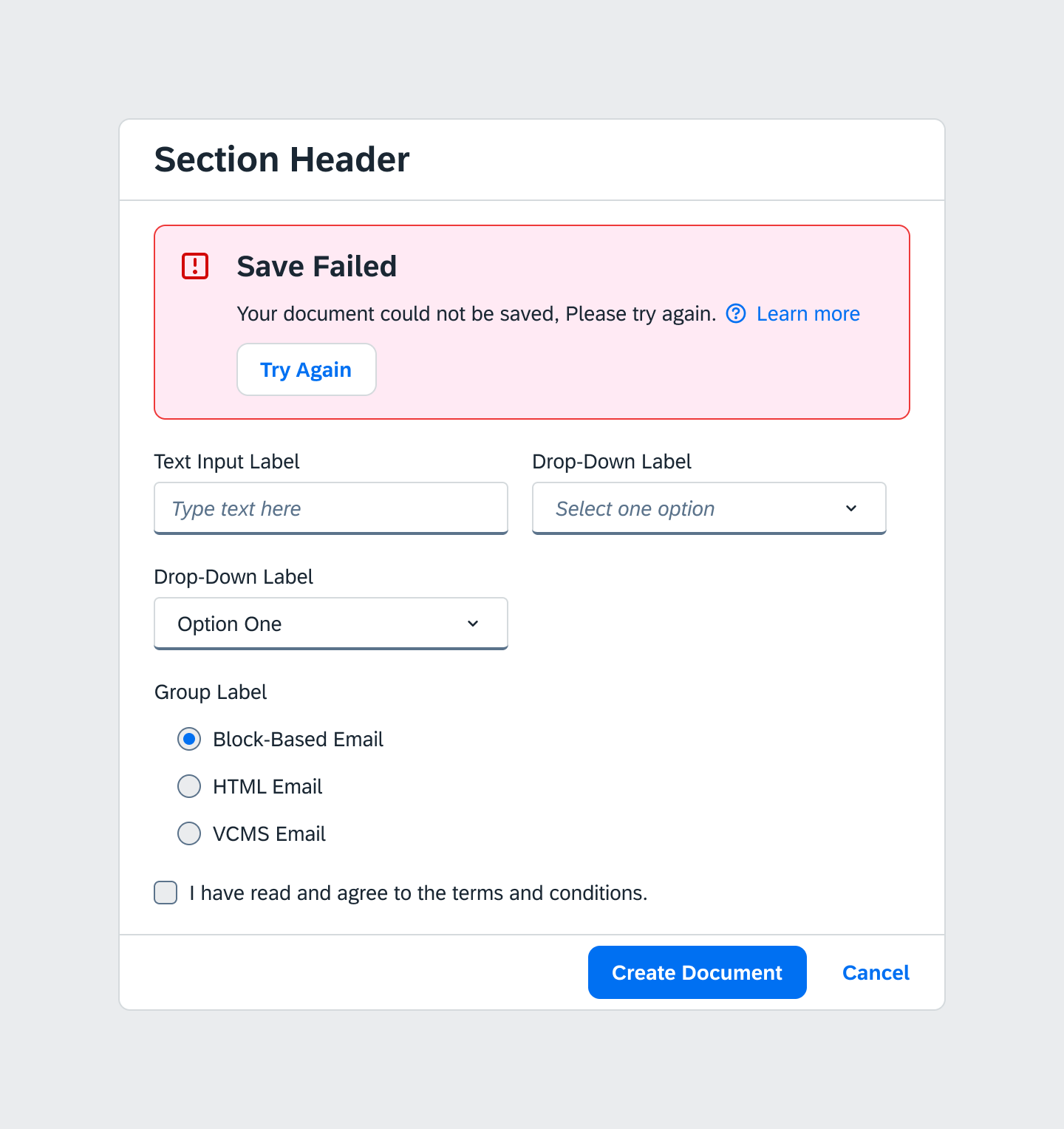
Select one option
Quotations:
- Use quotation marks to highlight user-made resource names in a sentence.
- Example: Your program "myfavouriteprogram" was distributed to account "Testaccount1".
- Use quotation marks to refer to values.
- Example: You can enable STO in a program if its status is "In Design".
- Use quotation marks to refer to other sentences that would be syntactically confusing to include inline.
- Example: Check "I have read and agree to the terms and conditions" to continue.
Contractions:
- Use contractions like "can't", "don't", "isn't" to make the text sound friendlier.
- Do not use a contraction if you want to emphasize the verb. Use "Do not leave this page while the process is running" instead of "Don't leave this page".
- Avoid contractions with multiple meanings like "you'd" (can mean both "you had" and "you would").
Further English grammar rules:
- "Because of" vs "due to":
- "The upload failed because of an incorrectly formatted file." (after a verb)
- "The upload failure was due to an incorrectly formatted file." (after a noun)