AI Local Notice
Intro
The local AI notice pattern ensures users are informed when content is AI-generated, prompting them to verify its accuracy prior to use.
This guideline is mandatory for all user interfaces that involve AI-generated or AI-edited information. For more information on application scenarios, AI notice lifecycle, and AI impact assessment process, see the AI notice base concept.
The AI notice label is always used in combination with other experience patterns. Read the AI notice base concept to learn how embedded AI notice labels interact with other aspects of the experience.
Usage
The local AI notice pattern is mandatory to mark AI-generated content in high and very high impact decision scenarios where users interact with AI-generated or AI-edited information.
Do:
- To explicitly mark content areas which contain information generated by AI.
- Use the read only notice if there is no tooltip.
- Use the interactive notice with progressive disclosure if additional information is required in the context.
Don't:
- For uses other than disclosing the standard AI notice label as defined in this guideline.
- To mark non-AI-related content.
Variants
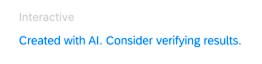
Interactive AI notice text
This variant is recommended for all applications with high and very high impact decision scenarios. It enables progressive disclosure of further information through a popover. For further information, see links.
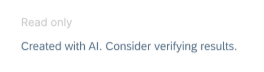
Read-only AI notice text
This variant should be used to meet basic labeling requirements and if no further details on the validation of AI results can be provided.
Placement
The placement of the AI notice text is crucial to support correct association of the AI notice text with the related AI results.
Limit the number of AI notice text instances to one per screen to avoid redundancy. If you find it difficult to identify the correct placement of the AI notice label, consider the following rule of thumb:
Place the text next to the lowest possible hierarchical title element that contains all present AI results.
Examples
- You have AI generated text or description → AI notice is placed under the input field or textarea.
- You have several assets generated with AI on the screen, and they are similar and placed close to each other → AI notice is - placed next to the section, or section title.
- AI has created content for multiple sections in your object page or generated the entire object itself, for example a report page → AI notice is placed next to the object title.
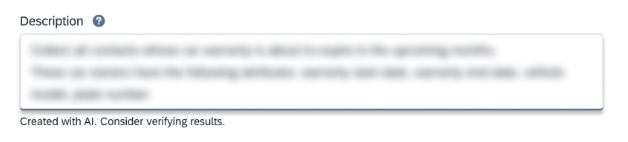
On top of content area
(High–Very high impact scenarios)
Place the embedded AI notice text between the section header and the content area where the AI result is displayed.
At the end of content area
(Low–Medium impact scenarios)
Place the embedded AI notice text in the footer of the AI results area. No additional AI content should appear below it, and it must remain within the boundaries of the associated section.
Behavior and Interaction
The local AI notice pattern uses progressive disclosure to indicate that the content was generated with AI and to advise users to review and fact-check results before use. For that purpose, the AI notice can include a link to open a long text description providing more details than the short text.
Progressive disclosure
Interactive AI notice indicators allow progressive disclosure at 2 levels:
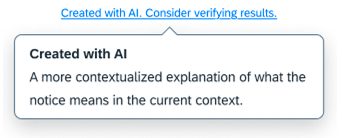
Level 1: AI notice long text with tooltip
- Provides a more contextualized explanation of what the notice means in the current context.
- Can be adjusted to fit the context it is used in.
Level 2: AI notice and tooltip with detail page/help portal link
- Contains a link to a dedicated page.
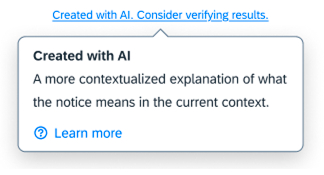
Define the wording and requirements for the AI notice long text together with your local AI user experience and user assistance experts in your product area.
Responsive Behavior
The AI notice label must never be truncated since the notice must always be fully readable. Wrapping should be avoided to keep the notice in one line. To accommodate for limited space, you should use breakpoints to show longer or shorter variants of the AI notice text.
How these principles are applied in practice is defined within the related pattern and/or component guidelines. For more information, see related links.
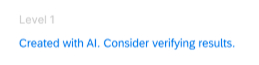
Standard AI notice label
Default for all AI application scenarios.
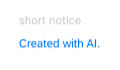
Short AI notice label
Exceptional use for placement in limited space.
<div class="e-field">
  <label class="e-field__label" for="textarea1">
    Textarea Label
  </label>
  <textarea class="e-input e-input-textarea" id="textarea1">This text was AI-generated!</textarea>
  <p class="e-field__message">
    <span class="text-color-faint">Created with AI. Consider verifying results.</span>
  </p>
</div>
<div class="e-field">
<label class="e-field__label" for="textarea1">
Textarea Label
</label>
<textarea class="e-input e-input-textarea" id="textarea1"></textarea>
<p class="e-field__message">
<e-tooltip content="A more contextualized explanation of AI usage." has-action><a>Created with AI. Consider verifying results.</a></e-tooltip>
</p>
</div><div class="e-field">
<label class="e-field__label" for="textarea1">
Textarea Label
</label>
<textarea class="e-input e-input-textarea" id="textarea1"></textarea>
<span class="e-field__message">
<e-tooltip content="A more contextualized explanation of AI usage. <e-help-portal-link article-id='fdf2e60e74c11014a81ee05ad954b102'></e-help-portal-link>" has-action><a href='#'>Created with AI. Consider verifying results.</a></e-tooltip>
</span>
</div>