AI UI Text
Intro
AI UI text serves as the primary means of communication between users and AI systems. It plays a crucial role in conveying information, instructions, errors, and feedback – ensuring that users can understand and effectively interact with the AI functionality.
Clear and concise UI text helps bridge the gap between complex AI operations and user-friendly experiences by guiding users, confirming actions, and providing context. Well-crafted UI text enhances usability, satisfaction, and accessibility.
This article provides practical guidelines for designing UI text in AI interfaces. By following these recommendations, you can craft clear, effective, and user-friendly AI interactions that meet users’ needs and expectations.
The guidelines are based on US English, the primary source language at SAP. There are no specific SAP Fiori text guidelines for other languages. This article will discuss effective use for UI text in AI, building on the existing UI Text Guidelines for SAP Fiori Apps, rather than replacing them.
Understanding Users and Context
Creating effective UI text for AI systems requires a deep understanding of the users and the context in which they interact with the system. This involves identifying the target audience, understanding their goals, and analyzing the tasks they will perform within various interaction environments:
- Recognize preferences: Determine the user preferences and habits to tailor the UI text.
- Understand user goals: Clarify what users aim to achieve with the AI system.
- Map user tasks: Identify and understand the specific tasks users will perform with the AI.
- Determine the interaction context: Consider the devices (mobile, web, smart devices) and environments (home, office, on-the-go) where users will interact with the AI.
- Adapt to the context: Ensure the UI text is suitable for various contexts, such as short prompts for mobile use or detailed instructions for web applications.
Adhere to the default labels provided below for text generation scenarios. We strongly recommend following the suggested wording to maintain consistency and familiarity for users. Only make changes to the default text if this is absolutely necessary for your specific use case.
If you find yourself in this situation, please reach out to the AI Experience team for further guidance.
Types of UI Text for AI
Explanations
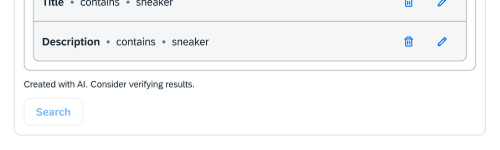
Explanations make AI actions and decisions clear to users, enhancing transparency and user trust. Explanations should be as concise and straightforward as possible.
Do:
- "Created with AI. Consider verifying results."
Don’t:
- "Generated utilizing advanced artificial intelligence algorithms. Validate output integrity prior to deployment."
For more information, see the patterns for AI acknowledgment and AI notice.
Instructions
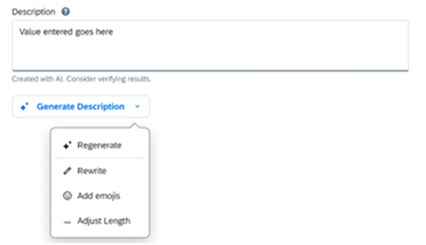
Instructions guide users through tasks within AI systems. They offer step-by-step directions to ensure users can efficiently and accurately interact with the AI, minimizing errors and confusion.
Adhere to the default labels provided below for text generation scenarios. We strongly recommend following the suggested wording to maintain consistency and familiarity for users. Only make changes to the default text if this is absolutely necessary for your specific use case.
Do:
- Offer step-by-step, easy-to-follow instructions. E.g. "Fix speeling and grammar", "Tell AI what to do"
- Ensure users can efficiently use AI features.
- Minimize user errors and frustration by providing clear and concise instructions.
Don’t:
- Don’t give ambiguous or confusing instructions. E.g. "Make corrections"
- Don’t provide overly complex instructions. E.g. "Ask Artificial Intelligence to generate content"
For more information, see the patterns for quick prompts and guided prompts.

Description
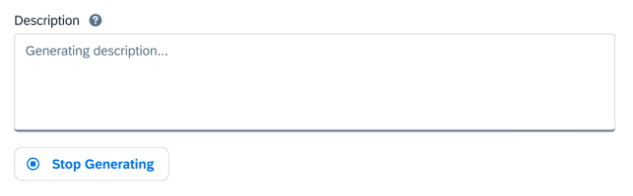
Descriptions introduce users to AI capabilities and benefits. They explain what the AI system does and how it operates, helping users understand its role and how to engage with it effectively.
Examples:
✅Output may contain errors.
✅Analyzing request…
❌Consider verifying AI output errors.
❌Artificial Intelligence is analyzing the current request…
Do:
- Clearly describe AI functions and capabilities.
- Let users know what to expect by using AI. E.g. "Output may contain errors."
- Explain how users can engage with AI.
Don’t:
- Don’t use generic or unclear descriptions.
- Don’t expect the user to trust what the AI outputs.
For more information, see the patterns for the AI progress indicator and AI prompt input.
Error Messages
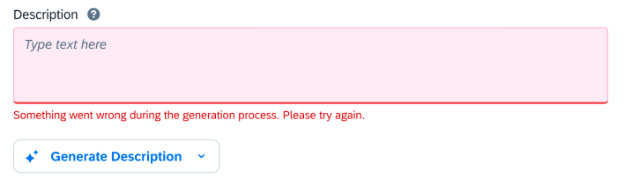
Error messages in AI interfaces provide clear, specific guidance on resolving issues. They help users understand what went wrong and offer actionable steps to fix the problem, reducing frustration and downtime.
Examples:
✅Something went wrong during the generation process. Please try again.
✅It looks like an error occurred during the generation process. Try generating again.
✅Your request couldn’t be generated. Try refining your request and generating again.
❌System error. Contact administrator.
❌Artificial intelligence is having trouble understanding you.
Do:
- Help users resolve the issues that arise during interactions with AI.
- Give users clear and actionable directions on what went wrong and how to fix it.
- Turn setbacks into manageable situations.
Don’t:
- Don’t provide vague or generic messages.
- Don’t suggest actions that are incorrect in the user’s context.
Summary
Designing UI text for AI interfaces involves creating clear, concise, and user-friendly communication that enhances user interaction and satisfaction. Ensure that you understand the target audience and their goals, use simple and direct language, maintain consistency in tone and terminology, and provide immediate and clear feedback. To ensure that text is readable for all users, it’s also essential to consider accessibility. Taking this user-centered approach makes AI interactions intuitive and effective, and fosters a seamless user experience.